This is an old revision of the document!
Image Expression Type
The Image Expression Language is used by the five calculator functors to evaluate algebraic and logical expressions. The complete operator reference — including full syntax tables, availability notes, null value handling, EGO Script examples, and practical examples — is in Calculate Functors — Complete Operator Documentation.
GUI Editor
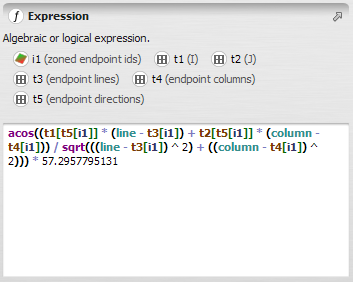
The editor supports a few interactions that make it easier to work with identifiers:
- Hovering the mouse over an identifier (
i1,t1,v1, etc.) displays a tooltip for the functor and output port it is connected to. - Clicking an identifier inserts it at the current cursor position in the expression.
- If the functor connected to an identifier has an alias, that alias is shown in place of the numbered identifier (
i1,t1,v1, etc.), making the expression easier to read.
Note: The editor works exclusively with the verbose form. Abbreviated syntax is converted to verbose form automatically when the script is read. See Calculator functor shorthand and Conversion between forms for details.
Identifiers
In expressions, operands are referenced by type-specific identifiers:
iX— a connected map, where X is an integer from 1 to 100tX— a connected table or lookup table, where X is an integer from 1 to 100vX— a connected scalar value, where X is an integer from 1 to 100
Maps are connected via Number Map hook functors, tables via Number Table, and scalar values via Number Value.
In the abbreviated (shorthand) syntax, operands are referenced directly by variable name using type sigils: # for maps, % for tables and lookup tables, $ for values — eliminating the hook block entirely. See Calculator functor shorthand for details.
During logical expression evaluation, zero is false and any non-zero value is true.
Null Value Handling
A null value in any operand poisons the entire expression result. Two operators interrupt propagation: isNull() and ?. See Null Value Handling for the complete rules, exceptions specific to map calculators, and defensive patterns.
Operators
General Operators
Arithmetic, logical, and conditional operators with full precedence rules, including if/then/else, boolean and/or/not, comparison operators, +, -, *, /, %, ^, and the catch-error operator ?.
General Functions
Mathematical functions (sqrt, sin, cos, ln, exp, abs, ceil, floor, round, max, min, clamp, clampMod, signal, pi), stochastic functions (rand, rUniform, rNormal, rPoisson), and control functions (abort).
Value Operators
Retrieves a scalar value connected to a vX port.
Image Operators and Functions
Operators that work at the current cell: iX (cell value), iX[line, col] (coordinate lookup), null, isNull(), line, and column. Available in Calculate Map and Calculate Categorical Map only; line and column are also available in the two lookup table calculators with row-oriented meanings.
Lookup Table Operators
Single-key lookup table queries using rule-operators: exact match, lower/upper bounds, closest key, linear interpolation, key existence test, and named attribute lookup.
Table Operators
Multi-key table queries using a set of composite keys, returning values from a named, indexed, or default data column.
Image Neighborhood Functions
Window-based spatial aggregation: nbMin, nbMax, nbSum, nbProd, nbCount, nbAverage, nbMedian, nbMode, nbVar, nbStdDev. Available in Calculate Map and Calculate Categorical Map only.
Image Neighborhood Indexing Functions
Neighbourhood statistics used as indices to retrieve values from a lookup table or a second image: nbMinRef, nbMaxRef. Available in Calculate Map and Calculate Categorical Map only.
Convolution
Kernel-weighted convolution via nbConvol. Available in Calculate Map and Calculate Categorical Map only.
EGO Script
In an EGO Script .ego file, an image expression is enclosed in square brackets [ ]. The same expression can be written in verbose form (numbered identifiers, hook block required) or abbreviated form (named operands, no hook block). The following example marks each row of a lookup table where both a height and a slope threshold are met:
Verbose form:
if t1[line] >= v1 and t2[line] >= v2 then 1 else null
t1 = saddle heights table; t2 = saddle angles table; v1 = minimum height threshold; v2 = minimum slope angle threshold; line = key of the current row.
Abbreviated form:
if %saddleHeights[line] >= $minimumHeight and %saddleAngles[line] >= $minimumSlopeAngle then 1 else null
For the full EGO Script syntax — including the hook-block form and conversion between the two — see Calculator functor shorthand.